This blog contains Interesting Computer Knowledge.
Showing posts with label Computer Hack. Show all posts

Tuesday, 6 March 2012

Internet Download Manager has been registered with a fake serial number

The solution for this problem is not easily available and the only step the user left with is uninstalling the software completely. Even after several installation and uninstallation the problem exists unless you format your computer.If you want a permanent and exact solution for this problem follow these steps:-

1. Exit IDM from the taskbar before entering the serial.
2. Disconnect active connections to the internet.
3. Then go to the directory C:\Windows\system32\drivers\etc and locate the file 'hosts'
4. Open the "hosts" file with "notepad".
5. on the last line enter the following address as shown and save. 


127.0.0.1 www.internetdownloadmanager.com 
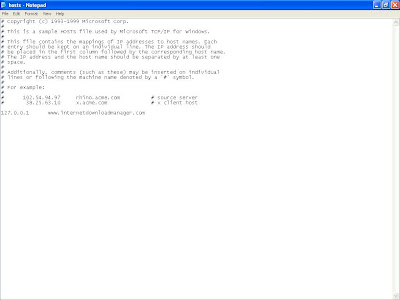
6. Now, again enter the "fake serial" and wait for few seconds.
7. your IDM is registered again.
8. No wonder you would be facing this problem again but without panic use a "new fake key" ( this time steps 3,4 and 5 are not required, the only thing required is "a keygen" for generating a new key. For IDM 5.14 Dr.Carbon Keygen is used ).


Tuesday, 18 October 2011

Some Tips to Your System faster


1.Boot Faster: The 'starting Windows 98/XP' message on startup can delay your booting for a couple of seconds.  To get rid of this message go to c:\ and find the file Msdos.sys.  Remove the Read-Only option.  Next, open it in Notepad or any other text editor.  Finally, go to the text 'Options' within the file and make the following changes: Add BootDelay=0.  To make your booting even faster, set add Logo=0 to remove the Windows
http://konac.kontera.com/javascript/lib/imgs/grey_loader.gif
logo at startup.

2.Restart only Windows: When restarting your PC, hold down Shift to only restart Windows rather than the whole system which will only take a fraction of the time. Follow these tips and you will definitely have a much faster and more reliable PC!
3.Faster Start-Menu Access: Go to the Start menu and select Run.  Now type Regedit and hit Enter.  The Registry Editor-will appear on the screen.  Now, open the folder HKEY_CURRENT_USER\Control Panel\Desktop.  You should see a MenuShowDelay value.  If you don't then do the following: right click on a blank space in the right pane and select New\String.  Change the name in the new value to MenuShowDelay.  Now that we have the MenuShowDelay value, double click on it and enter 0 in the value data field.  This sets the start menu delay to 0 milliseconds.

4.Faster Internet Access: If you use the internet
http://konac.kontera.com/javascript/lib/imgs/grey_loader.gif
for reference and the sites you visit are rarely  updated then try the following.  In IE (the same can be done in Netscape) go to Tools, Internet Options.  Next, click on Settings... in the Temporary Internet Files  section.  Finally, select Never for the first option and double the amount of storage space to use, click OK!


Wednesday, 28 September 2011

Boot Or Start Computer Faster

Some slight changes can do wonders for your system:

1. Press start->run then type msconfig and press enter.

Go to the startup tab. Here you will see a list of startup items. These are all the programs that automatically start when you boot your PC. It is these that slow down the boot up process.
                                 So uncheck all the unwanted items like ms-office, messengers other utilities that u may not need at startup). Don't uncheck your antivirus software.

Restart your Pc to and see for yourself, your pc will now boot faster....  
    
2. A great new feature in Microsoft Windows XP is the ability to do a boot defragment. This places all boot files next to each other on the disk to allow for faster booting. By default this option is enabled, but on some systems it is not, so below is the information on how to turn it on:

Go to Start Menu and Click Run
Type in regedit then click ok
Find "HKEY_LOCAL_MACHINE\SOFTWARE\Microsoft\Dfrg\BootOpt imizeFunction"
Select "Enable" from the list on the right
Right on it and select "Modify"
Change the value to Y .
Reboot your Pc and see the change yourself.
 
3.SPEED UP BOOT BY DISABLING UNUSED PORTS.!!
You may have tried many tweaks like modifying windows XP start-up applications, prefetches, unload DLLs method, etc. And yes those methods do work for me.
                    I have just accidentally found out another way to give you an extra boost in windows XP's boot performance. This is done by disabling your unused devices in Device Manager. for example, if you don't have input devices that are connected to one of your USB's or COM ports, disabling them will give you an extra performance boost in booting. Go to Control Panel -> System -> Hardware tab -> device manager Disable devices that you don't use for your PC and then restart.